A worked example
Eight characters instead of your server address
If you run your own content server, its address is long, case-sensitive and miserable to type on a television remote. A code stands in for it. Here is what that looks like in a real app.
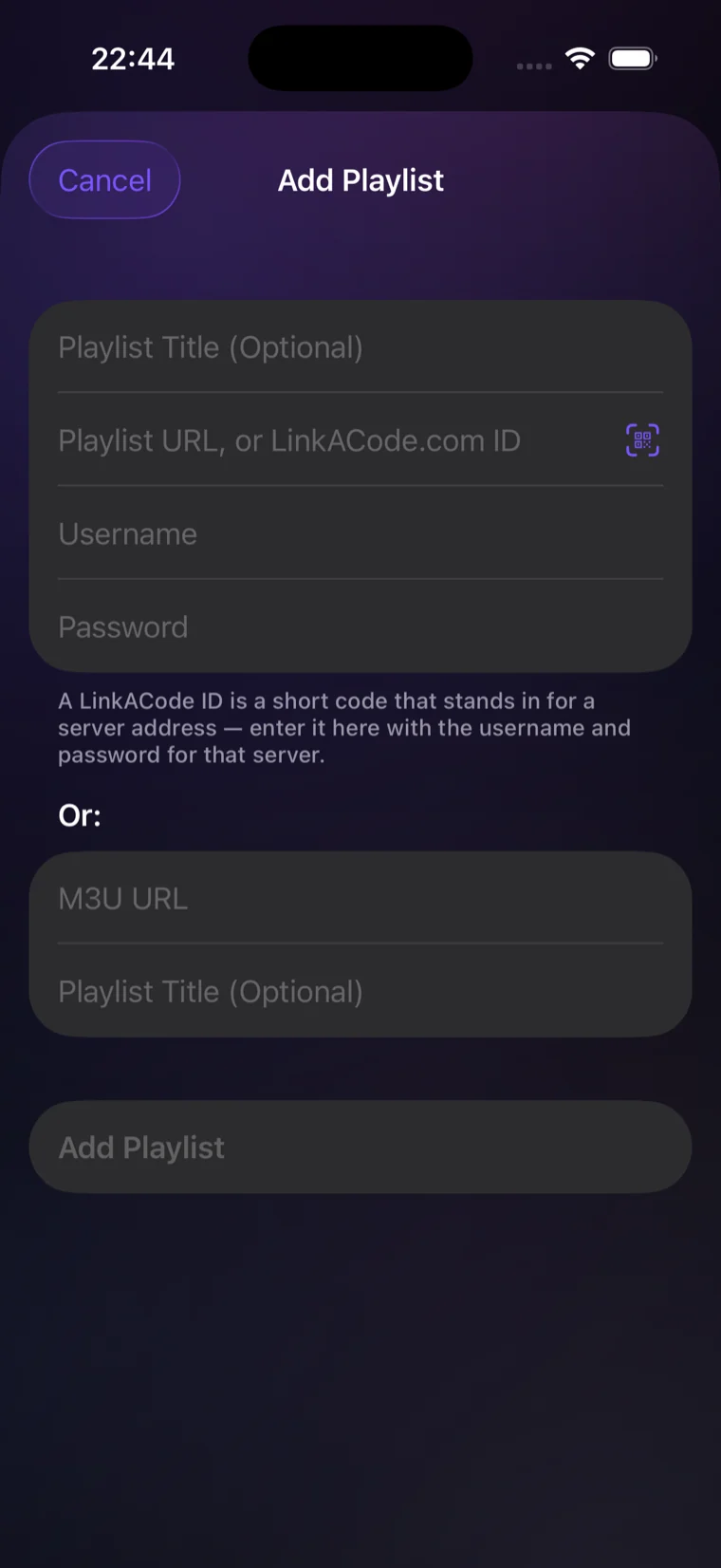
What happens here
- You point a code at your server. Once, on this site, in the box that asks for a server address.
- You type the code where the address would go. Eight characters instead of a URL. Everything else about setting up the playlist is unchanged — the username and password are your server's own, and you enter them exactly as before.
- The app asks us what the code stands for and connects to your server. That question and its answer are the entire extent of our involvement.
Why bother, if it is your own server
Your own devices, set up once each
A phone, a tablet, a television, a box in another room. Eight characters each, typed on whatever remote that device has, instead of a full address every time.
Move server without touching any of them
Change the host and you would normally re-enter the address on every device you own. Repoint the code instead and they all follow on the next check.
Nothing to read over your shoulder
The address is not on the screen while you type it, not in the app afterwards, and not recoverable from the code.
Or scan it
Every code comes with a share card — the code and a QR, nothing else. Apps with a scanner can take it straight off the card, so there is nothing to type at all.
Whose server it has to be
Yours, or one you are authorised to use. A code is a shortcut to an address you already have the right to connect to — it does not come with content, and it does not give you access to anything you could not already reach.
Get a code A different example: school printing
Vizi Player is shown as an example of an app with the field built in. Other apps may label it differently.